Music & sound effects
An original heavy loop, shotgun blasts, growls and pickup tones. Set music volume in Options → Sound. K1 controls music and effects; FM-1 MASTER sets overall output.
REAL DOOM ENGINE · EXPERIMENTAL FIRMWARE
Your synth has a dark side. Nine levels, three weapons, and a very different use for those piano keys.
FM-1 · SMK-37 Pro · SMK-37 Elite
Custom firmware by Chance Roth / @ChanceTheMaker
SMALL SCREEN. BIG TROUBLE.
Guards, imps, pickups, points.
And yes, it makes noise now.
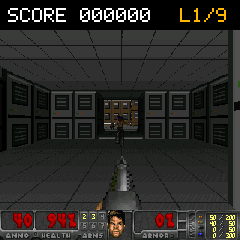
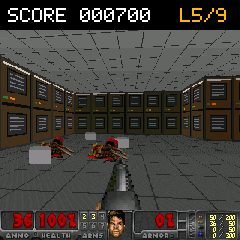
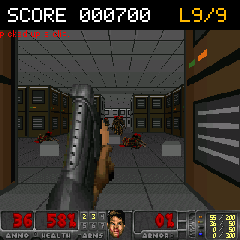
Captured from the shared game renderer at 240 × 240. Play it in your browser →
An original heavy loop, shotgun blasts, growls and pickup tones. Set music volume in Options → Sound. K1 controls music and effects; FM-1 MASTER sets overall output.
Freedoom guards and imps with attack poses and death animations. Guards score 100; imps score 200.
One core runs Doom, the display and controls. The other mixes the original music and sound effects.
CHOOSE YOUR WEAPON
The browser builds the correct firmware for your model using a checksum-verified base. No command line, and no firmware file upload needed when the automatic download is available.
Loading build details…
This replaces the synth application. Back up your projects first. There are no game saves. Normal USB installation works from Doom builds with USB updating enabled, stock firmware, or a compatible synth updater. Earlier Doom builds, or an interrupted flash, require a XIAO recovery adapter before updating. Keep it available in case recovery is needed.
Release 16 has passed build and package checks for all three models. Detailed hardware validation is ongoing. Keep power connected during installation.
Restore original M-VAVE firmware
Checking builds…
The same SHA-256 and model checks apply. FM-1 accepts the pinned Felucca Salt14 base; SMK accepts its official 016 .fwsc. The file stays in your browser.
Ready for a little controlled chaos.
LESS PRACTICE. MORE FIREPOWER.
Count the white keys from the far left.
FM-1 starts at F; SMK starts at C.
Keep moving. Use opens doors. Face the wall switch in the last room and press Use to exit. Fire or Use advances from results; Use retries after death.
Menu navigation. 2 up, 4 down, 1/3 adjust, 8 select, 7 back / close. SMK PATCH opens the menu and PARA selects. K1 controls volume; K2 scrolls up and down through menus. Separate sound levels are under Options → Sound.